The purse box template, flat and folded
What this template is for
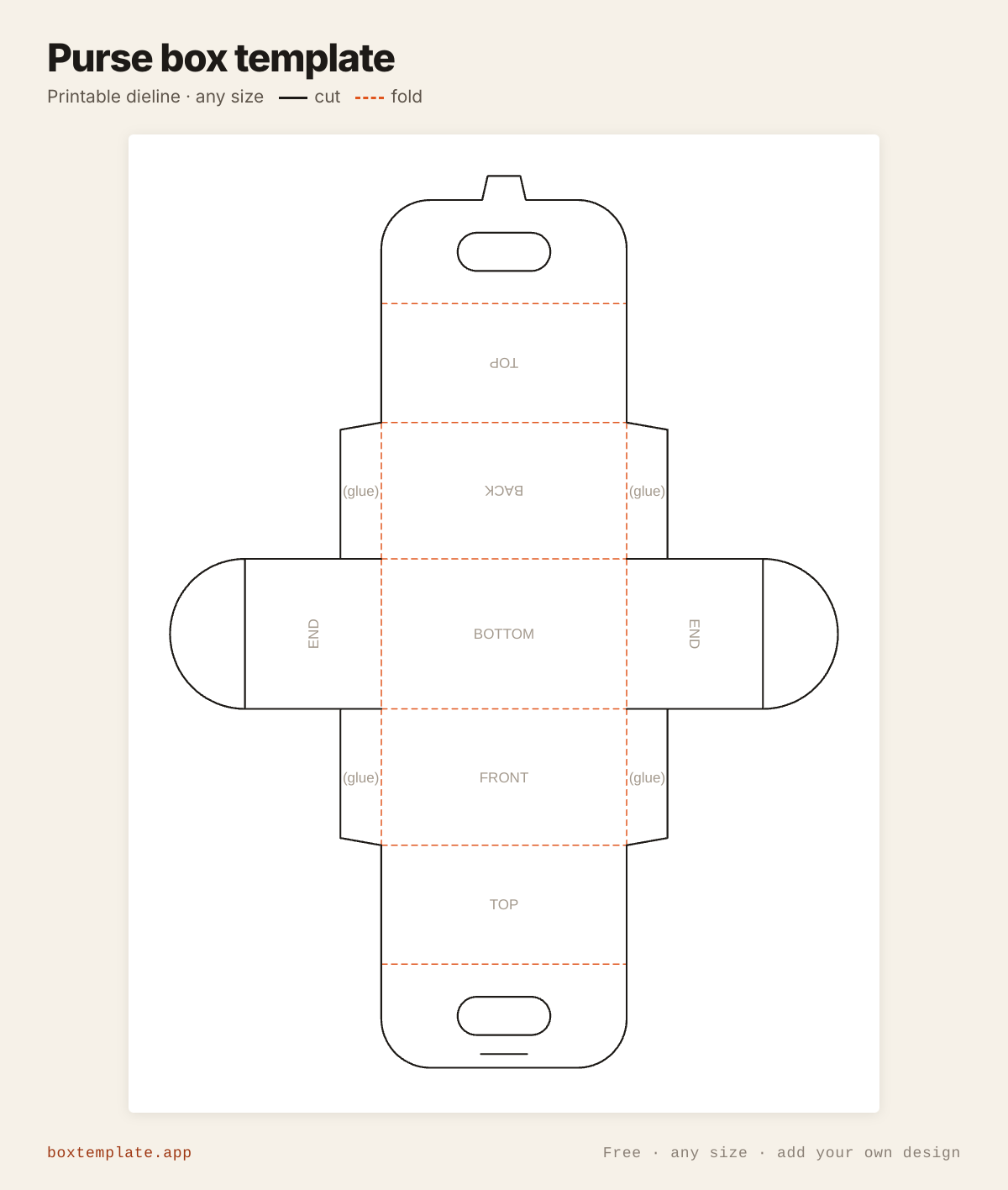
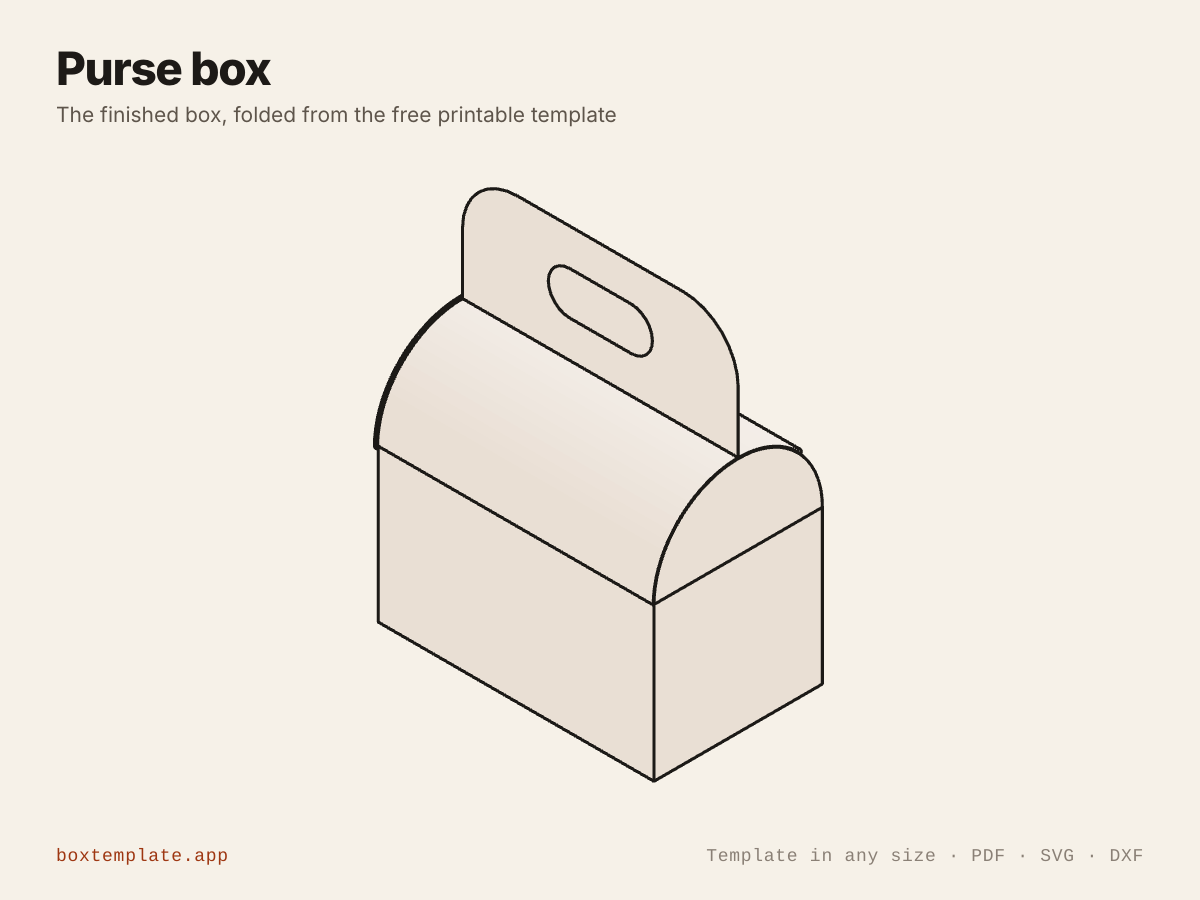
A little handbag. The front and back walls carry on upwards into two tongues that bend over into a rounded top, turn up where they meet and stand back to back, so the two grip holes line up into one handle — the handle is the lid rather than something added to it. The end walls rise into half discs that close the ends.
Also called handbag box · purse gift box · paper handbag · mini handbag box — all the same shape, and this is it.
- Wedding and party favour boxes
- Small gift and jewellery boxes
- Craft fair and Etsy packaging
- Kids’ craft and classroom projects
How to use this template
All four downloads are the same purse box at the same size — only the format changes.
- PDF printing at home
- Print at 100 per cent, or hand it to a print shop as "actual size, no scaling".
- PNG 300 dpi Canva, Photoshop, Procreate
- Upload, lock it in place and design your purse box on top. Free plan and phone included. Full Canva walkthrough →
- SVG Cricut, Illustrator, Inkscape, Affinity
- Vector, with cuts, folds and labels on separate layers. Cricut and Silhouette walkthrough →
- DXF Silhouette, laser and vinyl cutters
- Two layers, CUT and FOLD — and the one free Silhouette Studio Basic will open.
Printing it
- Type your size above, then download the PDF.
- Print at 100% — never “fit to page”, or every measurement comes out wrong.
- Too big for the paper? Pick your paper size and leave Fit the pieces to the page ticked: each piece gets its own place on a sheet and the PDF comes out with every page in it, nothing cut in half and nothing to tape.
How to put it together
These pictures are the purse box itself, not a generic diagram — change the measurements above and the template changes, but the three steps never do.
-
Cut the solid lines
Every solid line is a cut. Do the inside shapes first, while the sheet is still whole and easy to hold.
-
Score every dashed line
Dashed lines are folds. Score each one first — an empty ballpoint against a ruler — or the card cracks along the outside of the bend.
-
Fold, glue and hold
Fold the four walls up and glue each corner tab inside the end wall next to it. Fill the box. Then bend both tongues over the half-disc ends until they meet at the top, turn each up at its crease so the two stand back to back, and fold the tab on the back one over the top of the front one and into its slit. The two grip holes now sit on top of each other and make the handle. Do not score the curved part of the tongues — only the crease at the top.
Glue: a glue stick for paper, white PVA on card — hold each seam thirty seconds, and let it dry before you use it.
Questions about the purse box
- How does the handle work?
- It is not added on. The front and back walls carry on upwards into two tongues the full width of the box; bend them over until they meet at the top and push the tab on the back one through the slit in the front one. That locks the lid shut, and the two grip holes then sit on top of each other, so you carry the box by two thicknesses of board rather than one — which is what makes it strong enough to lift.
- How long are the tongues?
- Exactly a quarter of the circle the pair of them make. Bent over, the two tongues form a half cylinder across the box, so each one has to travel a quarter of that circumference to reach the middle. The tool works it out from the depth you type, and adds a board thickness because the walls stand outside the floor — a tongue even a few millimetres short leaves the box gaping.
- Will it print on one sheet?
- At the sizes it opens with, yes — the drawing is about 190 by 251 mm, which clears A4 and US Letter with room for the margin no home printer can print inside. Make the box much bigger and it will need a larger sheet or the split-across-sheets option.
- What paper should I use?
- Something that bends without cracking, because the top is a curve rather than a fold: 160 to 250 gsm card is ideal. Thin printer paper works for a very small box but will not hold the handle. Score the straight fold lines, but leave the tongues unscored — they are meant to curve.
Print your own design on it
Add a logo, photo or pattern in the panel on the left and drag it onto the purse box. It is trimmed to the cut outline, embedded properly in the PDF, and never leaves your computer — most free template sites hand you the outline and stop there. How printing your own design works.
Templates like this one
In these collections: Wedding and party favour box templates
See all 118 templates · For Canva · For Cricut · For Etsy sellers · Getting it printed
Collections: Wedding and party favour box templates · Christmas box templates · Food box templates